Eligibility check
Before you spend hours on an application, check that you can apply. The eligibility check reads the opportunity's own requirements and compares each one with your degree, grades, English and fee status.
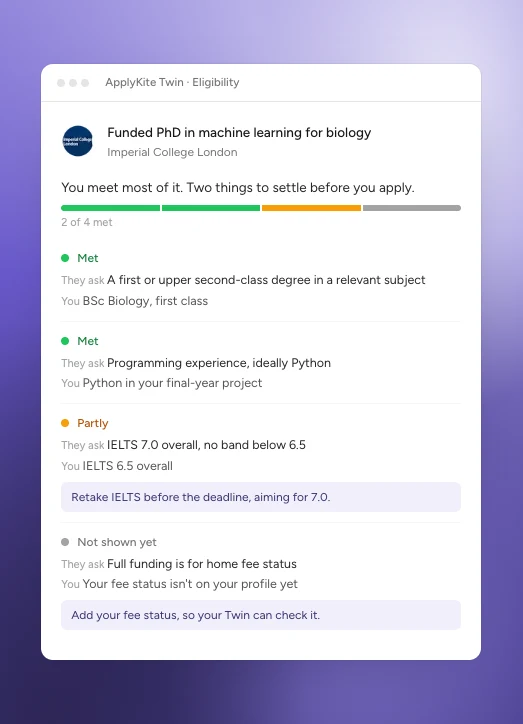
An example.
Run a check
- Open a position or scholarship in your dashboard.
- In the ApplyKite Twin box beside it, select Check my eligibility.
You can also start it from the opportunity's panel in your Tracker. In the ApplyKite Twin tab, the Eligibility check card asks you which opportunity to check.

Read the result
At the top you get one of four answers:
- You meet what they ask for
- You look eligible, with a few things to settle
- There isn't enough to say yet: add the missing details, like your CV or English test
- You don't meet a requirement
Under it, each requirement is listed as met, partly met or not shown yet, with what they ask and what you have. Where something is missing, the Twin offers the next step: upload your CV, add an English test, or start a document.
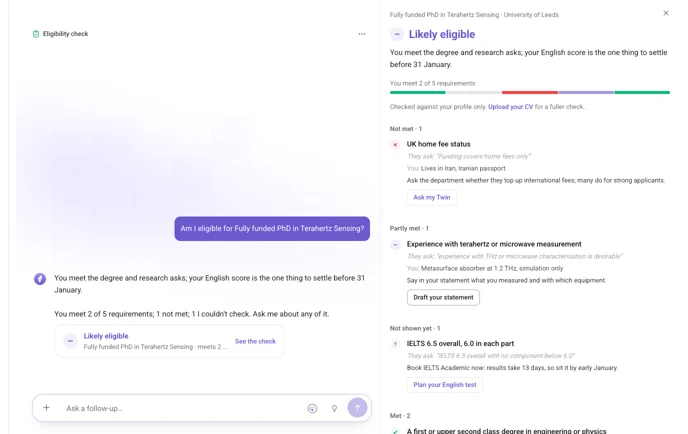
Some funding is only for home students. Add your fee status (home or international) in Settings → Profile so the check can tell.
The check is a guide. The university or funder makes the final decision, so confirm anything unclear with them.