What is ApplyKite Twin?
ApplyKite Twin is your application assistant. It knows your goal, your plan and your deadlines, and it learns about you as you apply. It finds openings, professors, funding and papers, writes emails, CVs and proposals with you, and keeps your roadmap and Tracker up to date.
ApplyKite Twin replaces ApplyKite AI (Kite AI). Your old chats are still there: open one and you can carry on in the Twin.
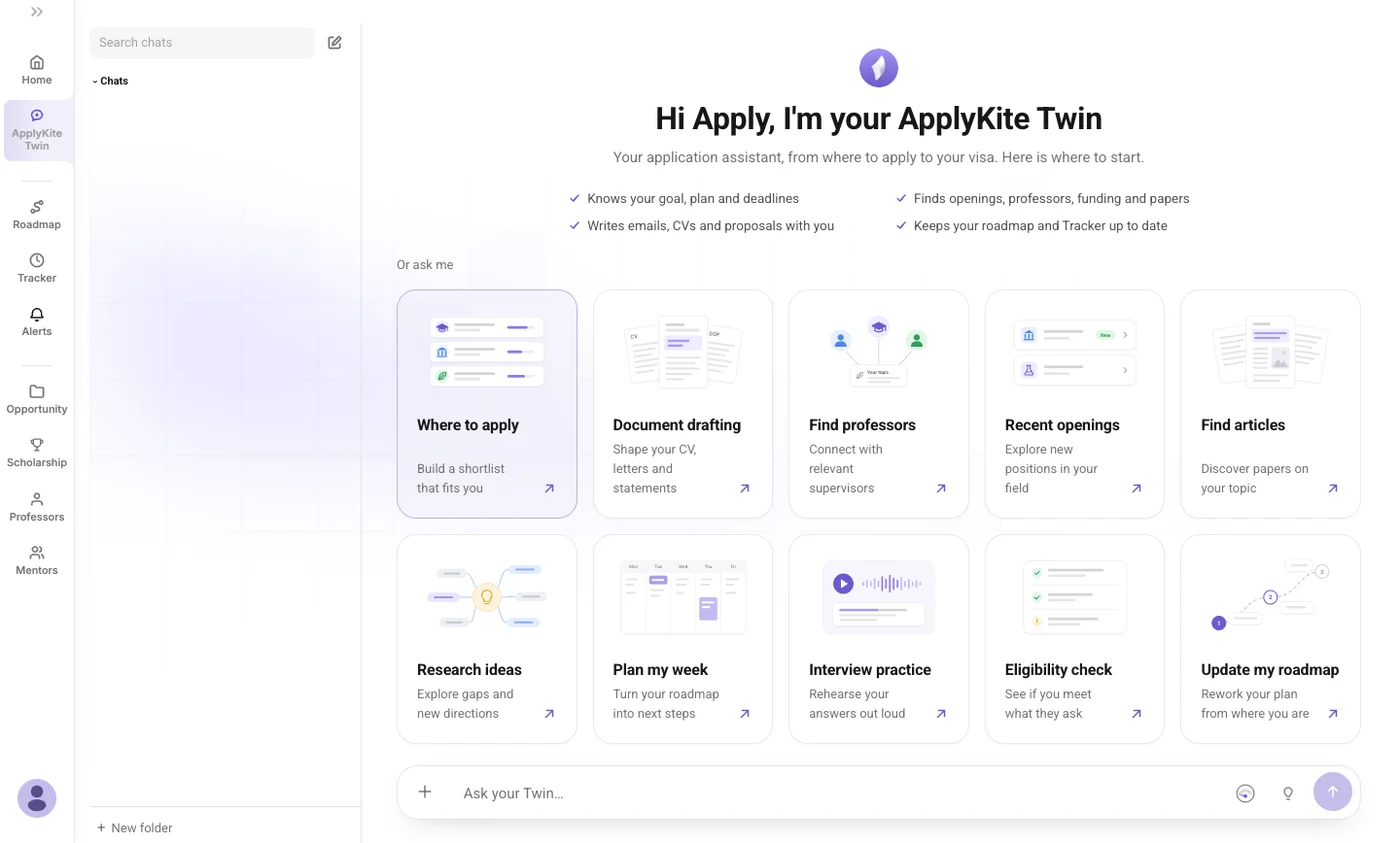
Where to find it
- The ApplyKite Twin tab in the left menu: a full chat with all the tools.
- Home: the Ask my Twin buttons and the ask bar.
- Beside every position, professor and scholarship: a Twin box for that one opportunity.
Start a chat
Type your question in Ask your Twin… and press send. Or pick one of the cards to start with a tool:
| Card | What it does |
|---|---|
| Where to apply | A shortlist of universities and professors that fit your research |
| Document drafting | Your CV, cover letters and statements, written with you |
| Find professors | Supervisors working on your topic |
| Recent openings | New positions in your field |
| Find articles | Papers on your topic, read and summarised |
| Research ideas | Gaps in your field and ideas to work on |
| Plan my week | Next steps from your roadmap and deadlines |
| Interview practice | Rehearse your answers out loud |
| Eligibility check | See if you meet what an opening asks for |
| Update my roadmap | Rework your plan from where you are |
Bachelor's and Master's students see Find programmes and Find scholarships instead of the research tools.
The + button in the message box lists the same tools and lets you add photos and files.
Add files
You can attach up to 5 files to a message, 10 MB each: images, PDF, Word (.docx), Excel (.xlsx), CSV and text files. Older formats (.doc, .xls, .ppt, .rtf) aren't supported, so save them in a newer format first.
If you attach your CV, the Twin asks before using it to update your profile.
Thinking levels
The bulb button next to send sets how long the Twin thinks before it answers:
| Level | Best for |
|---|---|
| Off | The fastest replies |
| Light | A quick think first |
| Balanced | Most questions |
| Deep | Careful work, like a statement or a proposal |
| Max | The most thorough answers |
Free and Premium go up to Balanced. Deep and Max come with Pro. Deeper thinking uses more credits.
What the Twin remembers
Tell it something once, like your GPA, a deadline or a professor you've emailed, and it remembers. It uses your profile, your roadmap and your Tracker, so you don't explain yourself twice. It also:
- saves opportunities to your Tracker when you ask;
- keeps your roadmap up to date as you finish steps;
- sets up opportunity alerts after you confirm them.
Your chats
- Every visit to the Twin tab starts a new chat. Your earlier chats are in the list on the left.
- Search chats finds any past conversation. You can pin chats, put them in folders or delete them.
- While the Twin is answering, select Stop to stop it. If a reply fails, select Retry.
Languages
The Twin replies in the language you write in, including Persian. Documents stay in English unless you ask otherwise, and emails to professors are written in English.
Credits
Each message uses credits by its size: a short one uses less than 1, and deeper thinking uses more. The gauge in the message box shows how many you have left. See Plans and credits.
Good to know
- The Twin's answers come from ApplyKite's database of openings, professors and papers, and from the web when needed. Always check requirements and deadlines on the official page before you apply.
- Review every document before you send it. You're the author.
- Your chats and files are private to your account.