Statement of purpose
Your statement should sound like you, and be true. The Twin writes it from your CV and the story you tell it, for one opportunity or as a general statement, then helps you edit it sentence by sentence.
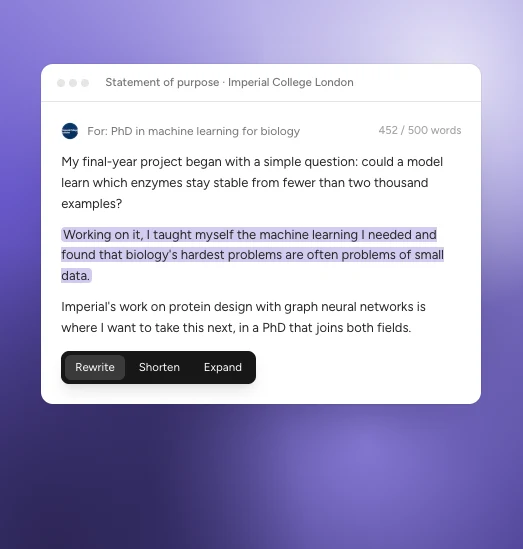
An example.
Start a statement
- In ApplyKite Twin, select Document drafting, then Statement of purpose, or
- on a position or scholarship, select Draft a statement in the ApplyKite Twin box.

The Twin asks a few short questions:
- The level: Bachelor's, Master's or PhD.
- What it's for: an opportunity you're tracking, or Any programme (general).
- Your story (optional): why this field, what you've done and where you want to go. A few sentences are enough. The Twin asks about anything missing.
It then writes the statement in the panel beside the chat, from your CV and your answers. It doesn't invent achievements.
Edit it
- Select a sentence or paragraph and choose Rewrite, Shorten or Expand.
- Type in the chat, for example "Make the opening more personal" or "Mention my internship."
- Edit the text yourself in the panel.
Each change is saved as a new version, so you can go back. The word count is shown at the top.
Save and download
Your statement is kept in Your documents under Statements of purpose. Download it as PDF or Word.
tip
Write one general statement first, then ask the Twin to tailor it for each programme. Read it aloud before you send it: if it doesn't sound like you, say so and the Twin will change it.